General information
If there are still (deactivated) content elements in the old design whose content should not be deleted on the 8th of April, you must transfer the content elements to the new design.
You can find detailed instructions on the ZIM webpage here
Most old content elements can be recognised by their name starting with "UPB". The most frequently used old content element is "UPB Content - Text".
The corresponding new content element is called "Text & Media". This element can also be used to save the content of various teaser elements from the old design for which there are no replacement elements in the new design. The conversion of the "UPB Accordion" element is particularly complex. Here, a completely new element of the type "accordion" must be created by hand
Rescue pages that are still in the old design.
To do this, a page that is in a multi-column page design (z2 - z7) must first be converted to a single-column design.
To do this, all content elements must first be mapped to the "Content" content block.
- To do this, open the corresponding content element and select "Content" in the "Column" drop-down menu.
- Repeat the process for all content elements that are not in the "Content" column.
You now have a single-column design and can continue with the conversion:
- Now select the "Appearance" tab under "Edit page properties" and select the "Content page" layout under "Backend layout (this page only)".
- Now gradually change all old content elements to new content elements. Please note that you must also convert the English elements for pages with English translations.
- Now go back to the page settings and change the "Backend layout (this page only)" to "none" and save. Immediately afterwards, reset the page layout to "Content page" and save again. This trick forces the UPB consultant to check the page again.
- If you forget to do this step, the UPB-Consultant may display outdated information.
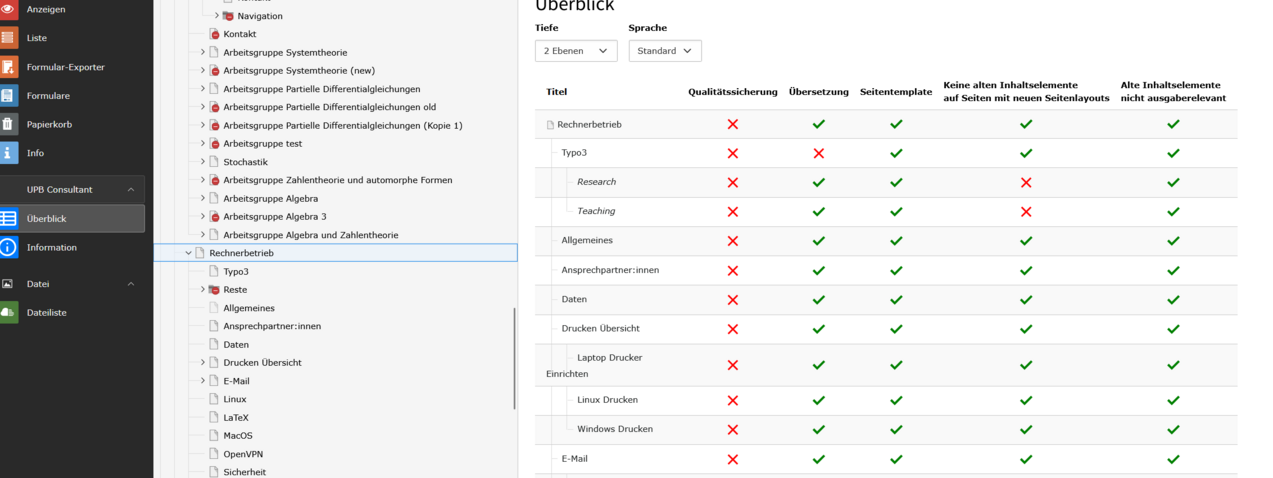
- After a page change, use the UPB Consultant to check whether the three columns on the right are highlighted in green.
If this is the case, the content of the page is retained.
Rescue old content elements on active pages
If there are still old content elements on active pages that may still be needed in the future, these must be migrated to the new design. If no migration is carried out, the old content elements will be deleted on 8th of April 2026.
You can recognise such pages in UPB-Consultant. In the entry for the page, the entry in the column "No old content elements on pages with new page layouts" is then highlighted in red.
Moving content elements with images
When content elements with images are moved, the path to the images is lost. It therefore makes sense to copy the image names before a changeover.
You can use the search function in the "File list" to find the path to the image and add the image to the new content element using the individual image names.
Correction of "unused" content elements marked in yellow
If content elements with a yellow background appear after the back-end layout has been changed, these elements could not be assigned in the new page template.
This applies in particular to elements that belong to an old "UPB accordion". To save their content, a new content element of the type "Accordion" must be created. The content of each entry must be copied and added to the accordion as a new entry. Once a copy of the old accordion has been created, the old "UPB - Accordion" can be deleted. All associated old content elements marked in yellow are automatically deleted.